Sharing ID documents online has honestly become just another part of daily life. Applying for a job, opening a new bank account, finishing a KYC check, booking a hotel room, signing up for a government portal — at some point, someone always asks you to upload your Aadhaar, PAN, Passport, Driving Licence, or Voter ID. Most of these requests are perfectly genuine, but sending your documents without taking a few basic precautions can quietly put your personal information at risk.
Scammers are constantly on the lookout for identity documents because a single file can carry so much — your full name, address, date of birth, ID number, photo, and even a scannable QR code. In the wrong hands, that's enough to run identity theft, financial fraud, phishing attempts, fake account signups, or other online scams that can take months to sort out.
The reassuring part? You don't need to be tech-savvy to stay safe. A handful of simple habits can massively lower your risk while still letting you complete real verifications without any hassle. This guide walks you through the safest ways to share identity documents online without giving away more than you need to.
Why Identity Documents Deserve Extra Care
Your identity documents are probably some of the most valuable pieces of information you own. Unlike a password, you can't just "reset" your Aadhaar number, passport number, or date of birth if someone copies them. Once those details are out there, they can float around for years and get reused in all sorts of shady ways.
Scammers rarely rely on just one source. They pick up your phone number from social media, your address from an old delivery order, your ID from a random file share — and then piece it all together. Suddenly, they have a full profile of you, and that's when convincing scams and impersonation attempts start to happen.
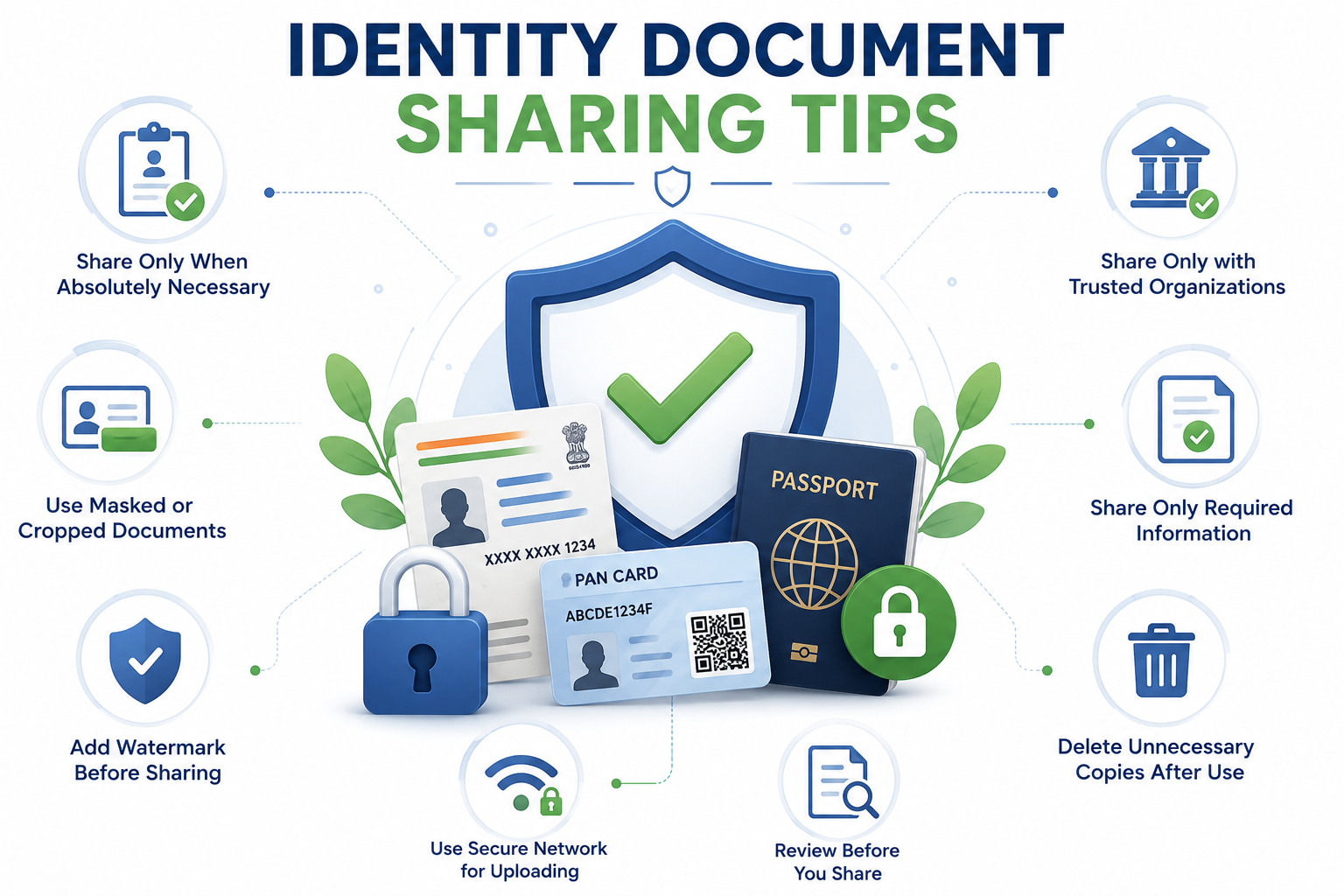
Only Share Documents With Trusted Organizations
Before you upload anything, take a moment to check who's actually asking for it. Real organizations use proper websites, official email IDs, and they'll usually tell you exactly why they need your document. If a request suddenly lands in your WhatsApp, SMS, Telegram, or DMs, treat it with a healthy amount of suspicion until you've confirmed it.
Go directly to the official website or call their verified support number before sending anything. Don't rely on random links from unknown people — phishing pages today look almost identical to the real thing, and one wrong click can undo everything.
Use Masked Documents Whenever You Can
A lot of verifications don't actually need your full ID. Whenever it's an option, use a Masked Aadhaar instead of the regular one. It hides the sensitive digits while leaving enough visible to identify you, which is a huge win for your privacy.
The same idea works with other documents too. If only your photo or name is required, crop out the rest before uploading. Privacy experts call this "data minimization," but really it just means: share what's needed and nothing more.
Add a Watermark Before You Send It
Adding a simple watermark is one of the easiest ways to stop your document from being misused elsewhere. Something like "Only for XYZ Bank KYC – July 2026" written across the file makes it a lot harder for someone to reuse it for anything else.
Place the watermark diagonally across the document, but make sure it doesn't cover the important verification details. This way, the legitimate organization can still confirm your identity, but anyone trying to reuse the file gets a very clear "no."
Always Review the File Before Uploading
It's really common to open the gallery, tap the first file that looks right, and hit upload. But before you press that button, zoom in and actually check what's on the page. Make sure there are no extra pages, random notes, unrelated QR codes, or signatures hiding in the file.
If you're sharing a scanned PDF, flip through every page. It's surprisingly easy to attach an extra page by mistake — and that one extra page could contain information you never intended to share.
Skip Public Wi-Fi When Uploading Sensitive Documents
Free Wi-Fi at airports, cafés, hotels, malls, and railway stations is super convenient — but it's rarely as safe as it feels. On unsecured networks, someone with the right tools can peek at data being sent through poorly protected websites, and that's the last thing you want when you're uploading an ID.
Whenever possible, stick to your home Wi-Fi or use your mobile data for sensitive uploads. If you're constantly travelling and working on the go, a reliable VPN can add another solid layer of protection.
Share Only What's Actually Needed
People often upload their entire ID even when the verification only needs a small part of it. That's just extra information handed out for no reason. Before uploading, take a second to read the instructions and figure out what's actually required.
If they only need your name and photo, don't send the full document with your address, ID number, and QR code on display. The less you share, the smaller the risk if that file ever ends up somewhere it shouldn't.
Keep Shared Documents Organized
It really helps to keep a dedicated folder for documents you've shared. Naming files with the recipient and the date makes it much easier to track where your info has gone and clean up older files you no longer need.
For example, instead of saving something generic like Aadhaar.pdf, try Masked-Aadhaar-ABC-Bank-July-2026.pdf. It sounds like a small thing, but a few months down the line, you'll thank yourself for the clarity.
Delete Temporary Files Once You're Done
Scanner apps, messaging apps, and cloud services love to hang on to your files long after you actually needed them. Those forgotten copies just sit around waiting to be exposed if your phone is ever lost, stolen, or handed to someone else.
Once your verification is done, take a minute to clean up. Delete extra copies from your downloads folder, WhatsApp media, cloud drives, and gallery. Fewer copies floating around means less to worry about later.
Double-Check Website Security Before Uploading
Before uploading anything, make sure the website is genuinely secure. Look for https:// at the start of the URL and confirm that the domain name matches the actual organization — not a look-alike. Scammers often register domains that are just one letter or symbol off from the real one, hoping you won't notice.
If your browser flashes a security warning, shows a certificate error, or throws up suspicious pop-ups, close the tab and back away. When in doubt, open a new tab and type in the official URL yourself instead of following any link.
📚 Read More
A Quick Checklist Before Sharing Any ID
Before you send off any personal document, take a few seconds and mentally run through this checklist:
- Who's actually asking for this?
- Is the request coming from an official channel?
- Do they really need the full document?
- Can I send a masked or cropped version instead?
- Have I added a purpose-specific watermark?
- Am I on a secure internet connection?
If any of these feel uncertain, hit pause. Verify first, share later. One extra minute now can save you a whole lot of trouble down the road.
Final Thoughts
Identity documents are a must for a lot of online services, but they shouldn't be shared without thought. Every upload carries real personal information, and it deserves to be handled with care. By checking the recipient, masking your documents, using watermarks, verifying website security, and only sending what's actually needed, you can massively cut down your exposure to identity theft and fraud.
Safe document sharing isn't about avoiding the internet — it's about using it wisely. Build these habits now, and your privacy, finances, and digital identity will be a lot safer for it in the long run.
Frequently Asked Questions
1. Is it safe to send identity documents through WhatsApp?
Only if you really have no other option, and only to someone you've verified. Wherever possible, go through an official verification portal instead of a messaging app.
2. What exactly is a Masked Aadhaar?
It's a version of your Aadhaar where the first eight digits are hidden and only the last four are visible. It's much safer for everyday verifications where the full number isn't really required.
3. Why should I bother adding a watermark?
A watermark clearly says "this was shared for one specific purpose," which makes it far less useful to anyone trying to reuse the file elsewhere.
4. Will organizations accept cropped documents?
Many do, as long as the required information is still visible. Just follow the specific instructions given by the organization you're dealing with.
5. Is public Wi-Fi okay for uploading documents?
Not really. Private Wi-Fi or your mobile data is a much safer bet when you're sending anything sensitive.
6. Should I keep backup copies of shared documents?
Keep only what you genuinely need and clear out temporary or old copies once the verification is over.
7. How can I tell if a website is safe?
Check for HTTPS in the URL, confirm the domain matches the real organization, and never continue if your browser is throwing security warnings.
8. Which documents need extra care when shared?
Anything with personal or financial info — Aadhaar, PAN, passport, driving licence, voter ID, and bank statements should all be treated with extra caution.
9. Does the Digital Safety Checker store my uploaded documents?
No. The tool is built to help you assess the risk of sharing without hanging onto your personal information.
10. What's the single best habit before sharing any ID document?
Verify who's asking, share only what's needed, use a masked version if possible, and add a purpose-specific watermark before you hit send.
Check Your Document Before You Share It
Give our free Digital Safety Checker a try before you upload anything. It'll help you spot unnecessary personal details in your file and suggest simple ways to make your document safer before you send it out.

Sameer Pal
Sameer Pal is a Content Writer specializing in online security, digital privacy, cyber awareness, and social safety. With over 3 years of experience, he creates practical, easy-to-understand content that helps readers recognize online threats, protect their personal information, and make safer decisions on the internet. His goal is to provide accurate, trustworthy, and user-focused guidance that promotes digital awareness and everyday online safety.
Featured Articles
Before Sending a Screenshot, Read This First
Simple, practical ways to share your Aadhaar safely while keeping your identity and personal information protected.
Read Article
10 Common Online Sharing Mistakes You Should Avoid
The most common online privacy slip-ups people make every day — and easy ways to steer clear of them.
Read Article
Best Practices for Safe Online Sharing
Follow these essential privacy habits to protect yourself while using social media and messaging apps.
Read Article