Every single day, we share more than we realise. A photo here, a screenshot there, a document dropped into a WhatsApp chat, a resume uploaded to a random portal, a payment confirmation forwarded to a friend. It all feels normal — and mostly, it is. But without a few careful habits, that quiet trail of small shares can slowly turn into a big privacy problem.
Following the best practices for safe online sharing doesn't mean going off the grid or being paranoid about every message. It's really about being a little more intentional — knowing when to pause, what to crop, who to trust, and how to send. The habits below are simple, practical, and genuinely make you a much harder target for scammers, data brokers, and identity thieves.

Why Safe Sharing Matters More Than Ever
Sharing in 2026 isn't the same as sharing five years ago. AI tools can now piece together identities from tiny fragments of data. Scammers no longer need to hack — they simply collect. A phone number from one post, a birthday from another, a document from a leaked chat, and suddenly they have enough to impersonate you convincingly.
That's why safe online sharing has become less about "big rules" and more about "small daily habits." A masked document, a cropped screenshot, a verified recipient — each of these tiny actions makes the difference between a normal week and a stressful one spent recovering your identity.
1. Always Verify the Recipient Before You Share
This is the single most underrated habit. Before sending anything sensitive, take a moment to confirm who's actually on the other end. Real banks, HR teams, government portals, and delivery companies never send urgent WhatsApp messages asking for scanned ID cards. Verify through the official website or a phone number you found yourself — not one shared in the same message.
That one habit alone stops the majority of phishing scams cold.
2. Share the Minimum, Not the Maximum
A lot of privacy problems start with over-sharing out of habit. Someone asks for "ID proof," and you send the full Aadhaar with address, QR code, and all. In reality, most verifications only need one detail — your name, photo, or last four digits.
Before sending, ask yourself: "What's the smallest version of this document I can safely share?" A cropped, masked, or partial version is almost always enough — and it exposes far less if it ever ends up in the wrong hands.
3. Use Masked and Watermarked Documents
This is a two-for-one habit that dramatically reduces misuse. A Masked Aadhaar hides your first eight digits, keeping the document usable but far less valuable to a scammer. Adding a watermark like "Only for XYZ Bank KYC – July 2026" makes the file useless for any other purpose.
Even if someone somehow gets hold of the file, they can't reuse it elsewhere. Watermarking is honestly one of the most powerful yet underused tools in personal privacy.
4. Review Every Screenshot Before Sending
Screenshots are quick, but they're also one of the easiest ways to accidentally leak information. Notification banners, browser tabs, WhatsApp contacts, unread email previews, or OTPs can all sneak into the frame at exactly the wrong moment.
Get into the habit of enabling Do Not Disturb before capturing, then cropping the image afterward. Blur anything sensitive that has to stay visible. It's a 15-second habit that saves a lot of regret.
5. Choose Direct Chats Over Group Shares
Sending a sensitive document in a group chat multiplies the risk instantly. Every member can forward it, screenshot it, back it up to the cloud, or share it with someone outside the group. Once your file lands in a group, you've essentially lost control over it.
Whenever it involves identity, finances, or personal information — send it one-to-one. Groups are for memes, not for KYC.
6. Use Secure Channels, Not Random Apps
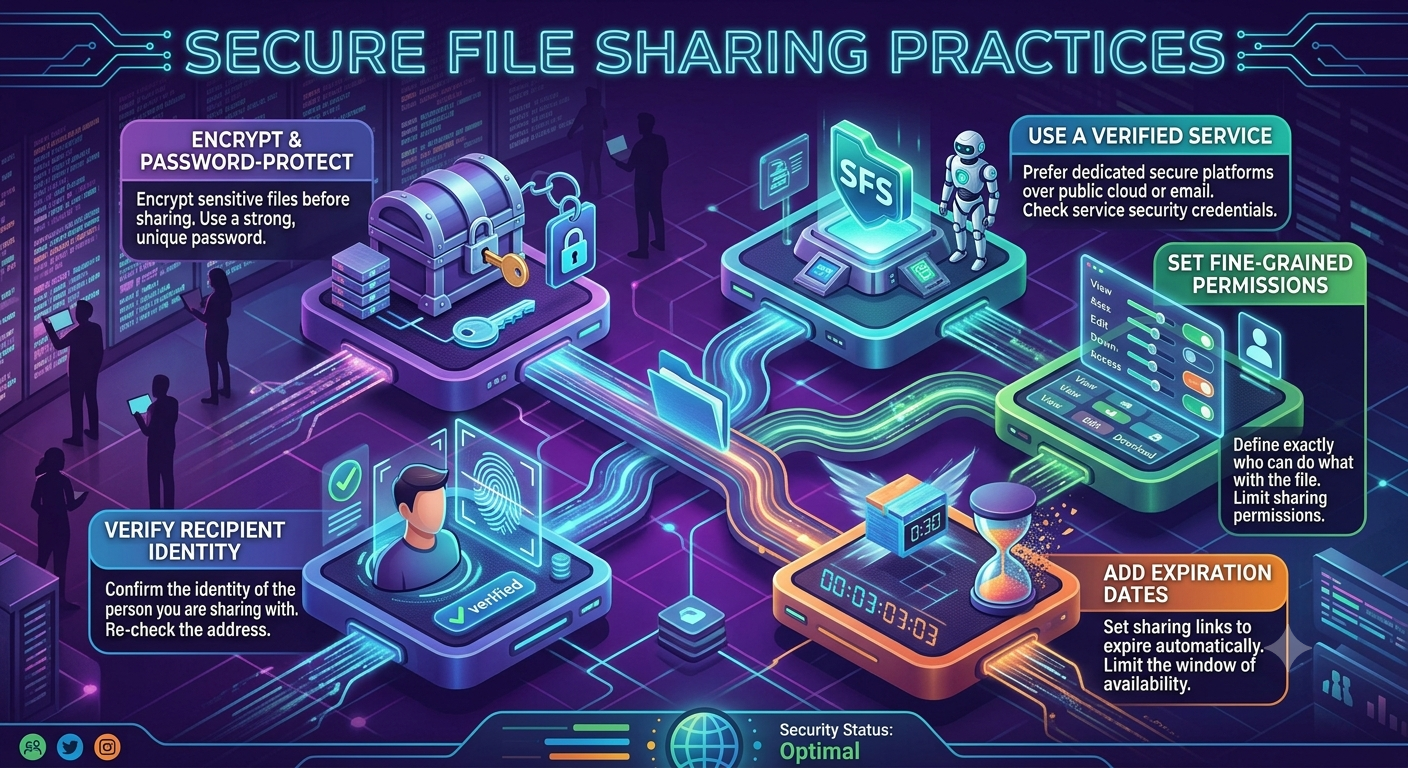
Not all sharing platforms are equal. Uploading your ID through an official portal with HTTPS and proper authentication is very different from mailing it to a random Gmail address or sending it via a random file-sharing website. Whenever possible, use the organization's official upload option instead of email or messaging apps.
If you must send it through email, avoid unsecured attachments — use password-protected PDFs and share the password through a separate channel.
7. Delete Temporary Copies After Sharing
Most people forget this one. After a verification is done, temporary copies of your document still hang around — in Downloads, WhatsApp Media, scanner apps, gallery, cloud backups, and email drafts. If your phone is lost, stolen, or borrowed by someone curious, those files become instantly vulnerable.
Once your work is done, do a quick cleanup. Delete extra copies from every location. Fewer copies = fewer risks.
8. Be Careful With Public Wi-Fi
Public Wi-Fi at cafés, airports, hotels, and railway stations is convenient but not always safe. Attackers can sometimes intercept unencrypted data on these networks, especially when users upload documents through poorly protected sites.
For anything sensitive, use mobile data or your home Wi-Fi. If you travel a lot, consider using a reputable VPN — it encrypts your traffic and adds another useful layer of protection.
9. Think Twice Before Posting on Social Media
Social media has a way of tricking us into sharing more than we intend. A vacation photo can reveal your location. A birthday post confirms your DOB. A "first day at office" photo shows your ID card. A boarding pass exposes booking info. Every post is a small piece of a bigger identity puzzle.
Before posting, ask: "If a scammer saw this, could they use it?" If yes, blur, crop, or skip it entirely.
10. Review Your Privacy Settings Regularly
Apps and platforms silently update their privacy defaults all the time. What was private six months ago might be public today. Every few months, spend 10 minutes reviewing your privacy settings on WhatsApp, Instagram, Facebook, LinkedIn, Google, and your phone.
Turn off unnecessary visibility, limit who can see your info, disable location sharing where it isn't needed, and cut down on connected third-party apps you no longer use.
📚 Read More
Bonus: A Quick Pre-Send Checklist
Before you share anything online, run through this quick mental checklist:
- Have I verified the recipient?
- Is this the minimum information they actually need?
- Have I used a masked or cropped version?
- Is there a watermark for this specific purpose?
- Did I check for hidden info like notifications or tabs?
- Am I on a secure network?
- Would I be okay if this file ended up elsewhere?
If even one answer feels unsure — pause. Verify, edit, and then share.
Final Thoughts
The internet isn't going anywhere, and sharing information online is now part of daily life. The goal isn't to avoid it — it's to do it a little more mindfully. Following these best practices for safe online sharing won't take much of your time, but it can save you from months of dealing with scams, identity fraud, or leaked personal data.
Think of safe sharing the same way you think about locking your front door. It's a small habit, done automatically, that quietly keeps a lot of trouble out of your life. Build these habits once, and they'll protect you for years to come.
Frequently Asked Questions
1. What is the most important habit for safe online sharing?
Verifying the recipient before sharing anything. Most scams collapse the moment you double-check who's actually asking.
2. Is it safe to share personal documents on WhatsApp?
Only when absolutely necessary, only to verified contacts, and preferably in a masked or watermarked format.
3. Why is data minimization important?
Because the less you share, the less anyone can misuse. Sharing only what's needed is one of the strongest privacy principles.
4. How does a watermark protect a document?
A purpose-specific watermark makes the file useless for any other verification, discouraging reuse and fraud.
5. Are screenshots really that risky?
Yes. They often capture notifications, tabs, contacts, and financial info that people don't realise are on their screen.
6. Should I avoid public Wi-Fi completely?
Not completely — but avoid uploading sensitive files on it. Use mobile data or a trusted VPN for anything important.
7. How often should I review my privacy settings?
Every 3–6 months is a healthy rhythm. Platforms frequently update defaults, so periodic reviews are essential.
8. Is email safer than messaging apps for documents?
It can be, especially when using password-protected files. But official verification portals are always the safest option.
9. Can old files on my phone become a privacy risk?
Yes. Forgotten document copies in Downloads, gallery, and messaging apps can be exposed if your phone is lost or accessed.
10. How can Digital Safety Checker help me share safely?
It evaluates the risk of a document or screenshot before you send it and suggests practical ways to make it safer.
Share Smart, Not Fast
Not sure if your file is safe to send? Use our free Digital Safety Checker to spot hidden privacy risks and get simple recommendations before you hit send.

Sameer Pal
Sameer Pal is a Content Writer specializing in online security, digital privacy, cyber awareness, and social safety. With over 3 years of experience, he creates practical, easy-to-understand content that helps readers recognize online threats, protect their personal information, and make safer decisions on the internet. His goal is to provide accurate, trustworthy, and user-focused guidance that promotes digital awareness and everyday online safety.
Featured Articles
Safe Ways to Share Identity Documents Online
Discover practical methods to send important documents securely using trusted platforms.
Read Article
10 Common Online Sharing Mistakes You Should Avoid
The most common online privacy slip-ups people make every day — and easy ways to steer clear of them.
Read Article
Best Practices for Safe Online Sharing
Follow these essential privacy habits to protect yourself while using social media and messaging apps.
Read Article