Learn how to use Digital Safety Checker to evaluate the privacy and security
risks of sharing documents, photos, screenshots, IDs and personal
information online before you press the send button.
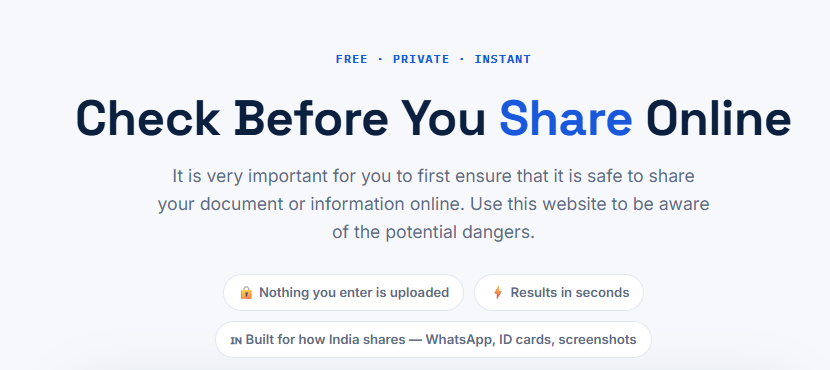
Digital Safety Checker homepage where users can start checking privacy risks before sharing personal information online.
Why You Should Check Before Sharing Online
Although the act of sharing information is something most people engage in regularly, there are many who do not consider how much more information is being inadvertently shared in something as simple as a document or screen capture.
An identity card may provide your home address; a boarding pass could have your booking codes; a CV may give out your contact details; and a screen capture from a banking application might unintentionally show account numbers or transaction history. It does not matter whether the information looks innocuous to you because scammers and hackers will use pieces of public information to construct a profile about you.
The purpose of Digital Safety Checker is to ensure that you take a moment to think before you post any piece of information online. Rather than making educated guesses as to what the risks are, the tool asks you a few practical questions and analyzes the possible risks related to the nature of the information, the platform and the intended recipients of the information.
The whole thing happens right within your web browser and no information is ever uploaded anywhere. You get instant feedback and tips to avoid potential risks.
Step 1 — Choose What You Are Planning to Share
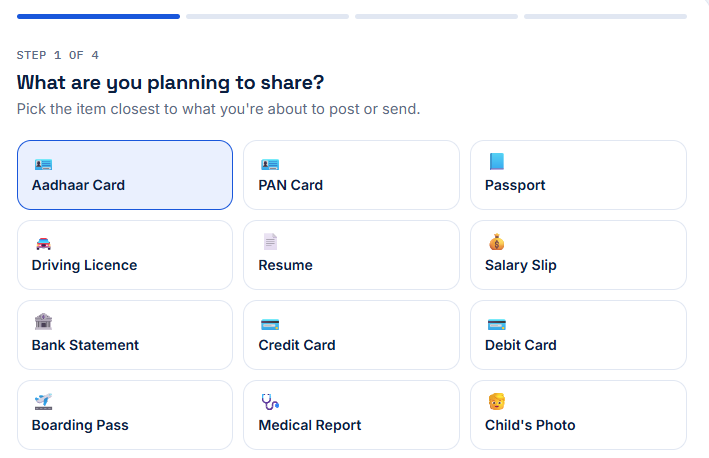
Digital Safety Checker homepage where users can start checking privacy risks before sharing personal information online.
The first step is to tell Digital Safety Checker exactly what you are planning
to share. This is one of the most important parts of the evaluation because
different types of information carry different levels of privacy risk.
For example, sharing a public event poster is very different from sharing a
government-issued identity document or a bank statement. Personal information
often contains details that can be misused if accessed by unauthorized people.
Understanding what type of data you are sharing helps the tool provide a more
accurate assessment.
Depending on the version of the tool, you may see options such as Aadhaar Card,
PAN Card, Passport, Driving Licence, Resume, Medical Report, Bank Screenshot,
Utility Bill, Child's Photograph, Selfie, QR Code, Office Document, Certificate,
Payment Receipt, Personal Photo or other common document types.
Select the option that best matches the information you intend to send. If your
document includes multiple types of personal information, always choose the
option that represents the highest level of sensitivity. This ensures the
recommendations are more cautious and better aligned with real-world privacy
concerns.
If you are unsure which category your document belongs to, think about the most
valuable information it contains. Does it reveal your identity? Does it include
financial details? Could someone use it to impersonate you or verify your
identity? These are the kinds of questions the tool is designed to consider.
Choosing the correct document type is essential because every privacy assessment
that follows is based on this selection. Once you've completed this step, you
can move on to identifying where you plan to share the information, which is
covered in the next step.
Step 2 — Where Are You Sharing It?
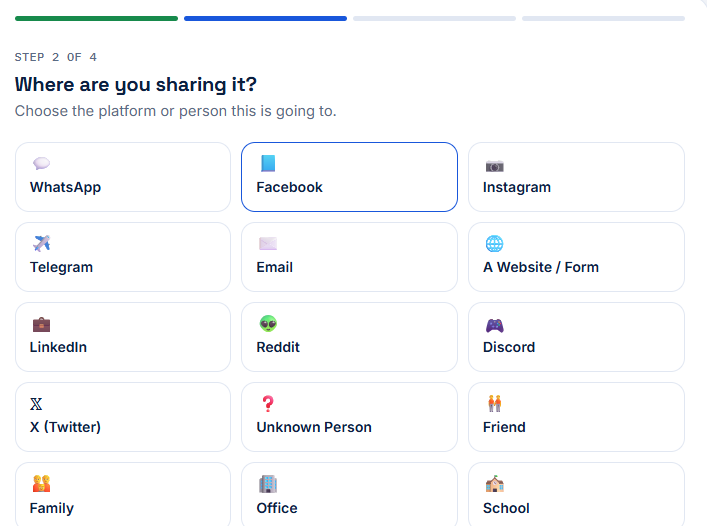
Digital Safety Checker homepage where users can start checking privacy risks before sharing personal information online.
After selecting what you are planning to share, the next step is choosing where the information will be sent. This may seem like a simple question, but the platform you choose plays a major role in determining how safe your personal information will be. Different websites, apps, and communication channels offer different levels of privacy, encryption, and access control. Understanding where your information is going helps the Digital Safety Checker provide a more accurate privacy assessment.
For example, sending a document through an encrypted messaging application to a trusted family member is generally much safer than posting the same document publicly on social media. Likewise, uploading sensitive files to an unknown website or sharing them with someone whose identity you cannot verify introduces additional privacy risks. The destination matters just as much as the information itself.
The tool includes common sharing options such as WhatsApp, Telegram, Email, Google Drive, Social Media, Online Marketplace, Government Portals, Office Platforms, Cloud Storage, and Public Websites. Simply select the option that best matches your situation. If the platform is public or accessible to many people, the privacy risk may increase even if the document itself contains only limited personal information.
Always ask yourself a few important questions before choosing where to share. Is this the official platform? Do you know the recipient personally? Can other people access the shared file? Will the information remain online permanently? Taking a few seconds to answer these questions can help prevent accidental exposure of sensitive personal information.
Privacy Tip
Whenever possible, use official websites or trusted applications that provide secure connections and access controls. Avoid uploading personal documents to unknown platforms without verifying their authenticity.
Step 3 — Who Can Access the Information?
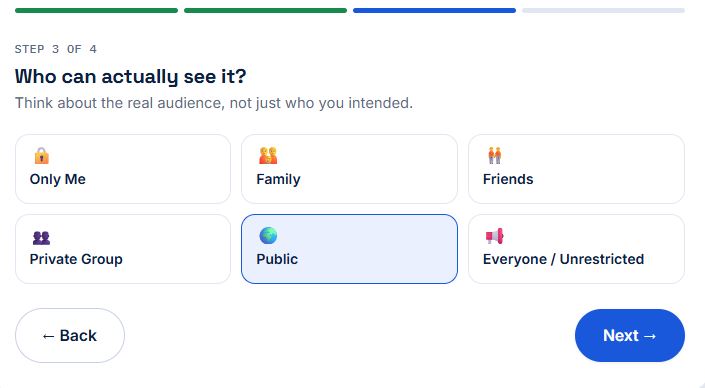
Digital Safety Checker homepage where users can start checking privacy risks before sharing personal information online.
The third step focuses on one of the most overlooked aspects of online privacy—who can actually see the information after it has been shared. Many people assume they are sending a document to only one person, but in reality, that file may later be forwarded, downloaded, copied, or stored elsewhere without their knowledge. Understanding who has access helps you make safer sharing decisions.
Digital Safety Checker asks you to identify the intended audience. Options may include Only Me, Family Members, Friends, Employer, School or College, Verified Organization, Private Client, Public Group, Unknown Person, or Everyone. Each option represents a different level of potential exposure. Sharing a document privately with someone you know is usually much safer than making it publicly accessible.
Even within trusted groups, it's important to consider how your information might be handled after it is received. Some messaging applications allow files to be forwarded with a single tap, while shared cloud links may remain accessible for weeks or even months if they are not configured correctly. Once information leaves your device, controlling who sees it becomes significantly more difficult.
Before sending any personal information, think carefully about whether every detail is actually required. If only your name or identification number is needed, consider masking your address, photograph, signature, or other sensitive details. Limiting the amount of information you share is one of the most effective ways to reduce privacy risks.
If the recipient is an unknown individual, an online buyer or seller, or someone claiming to represent a company, verify their identity before sharing anything. Many online scams begin with requests for seemingly harmless documents that are later used for identity verification fraud or social engineering attacks.
Important
Never share passwords, PINs, OTPs, authentication codes, or complete identity documents with unknown individuals or unofficial websites. Legitimate organizations rarely ask for this information through messaging apps or social media.
After completing this step, the Digital Safety Checker has enough context to understand what you are sharing, where you are sharing it, and who can access it. The final step is to explain why you are sharing the information. This allows the tool to generate a more personalized privacy assessment and provide recommendations based on your specific situation.
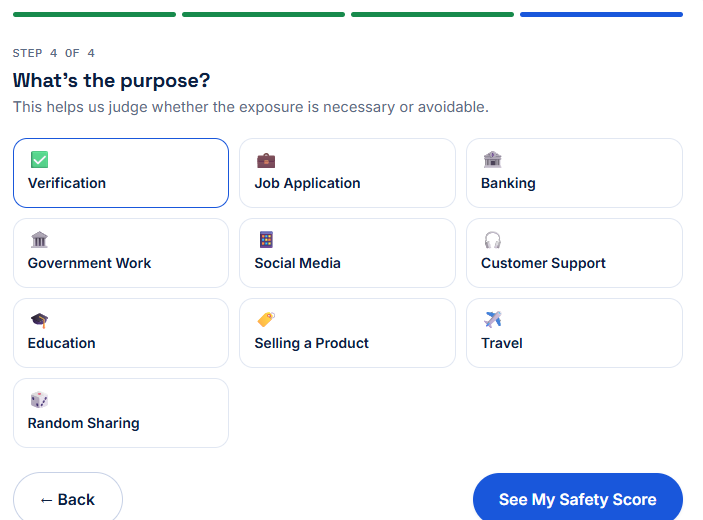
Step 4 — Why Are You Sharing This Information?
Digital Safety Checker homepage where users can start checking privacy risks before sharing personal information online.
The final question helps Digital Safety Checker understand the reason behind your decision to share personal information. The same document can carry different levels of privacy risk depending on its purpose. For example, sending an identity document to a verified government portal for official verification is very different from sending the same document to an unknown person through a messaging app.
Common reasons include identity verification, job applications, banking services, travel bookings, school or college admissions, insurance claims, online shopping, customer support, property verification, healthcare services, or personal communication. Selecting the correct purpose allows the tool to compare your situation with common privacy practices and generate more relevant recommendations.
Before submitting your answers, take a moment to review every selection. Ask yourself whether the recipient genuinely requires the complete document or whether a partially masked version would be sufficient. In many situations, hiding unnecessary information such as your address, identification number, QR code, signature, or financial details can significantly reduce your privacy risk without affecting the purpose of sharing.
Once you confirm your answers, the Digital Safety Checker instantly evaluates the information and generates a personalized Digital Safety Score. Since everything runs locally in your browser, your selections remain private and are never uploaded or stored.
Best Practice
Share only the minimum information required to complete a task. If certain details are not necessary, remove or blur them before sending the document.
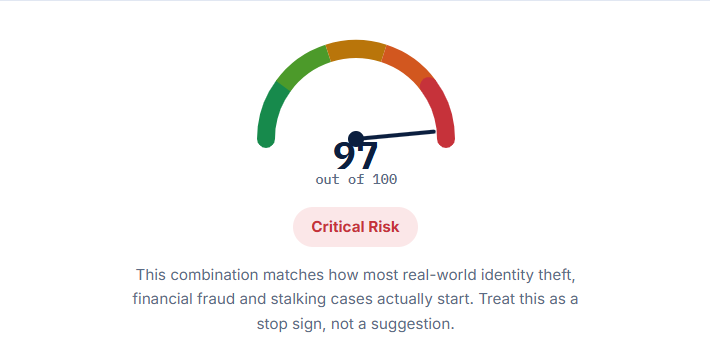
Understanding Your Digital Safety Score
Digital Safety Checker homepage where users can start checking privacy risks before sharing personal information online.
After completing all four steps, the Digital Safety Checker calculates your Digital Safety Score. This score is designed to give you a simple and easy-to-understand overview of the potential privacy risk associated with your sharing decision. Rather than using technical security terminology, the tool presents a clear risk level that anyone can understand.
The score considers several important factors, including the sensitivity of the information, the platform where it will be shared, the intended audience, and the purpose of sharing. These factors work together to estimate the overall level of privacy exposure.
You may receive one of several safety levels, including Safe, Low Risk, Moderate Risk, High Risk, or Critical Risk. A lower risk score generally means the information is being shared in a controlled and appropriate manner. A higher score indicates that additional precautions should be taken before sharing.
Remember that the Digital Safety Score is designed as a decision-support tool rather than a legal or cybersecurity certification. It helps you identify possible privacy concerns so you can make informed decisions before sharing personal information online.
Important
A "Safe" score does not guarantee complete protection, and a "High Risk" score does not always mean you should never share the document. The score simply helps you understand potential privacy risks and encourages safer sharing practices.
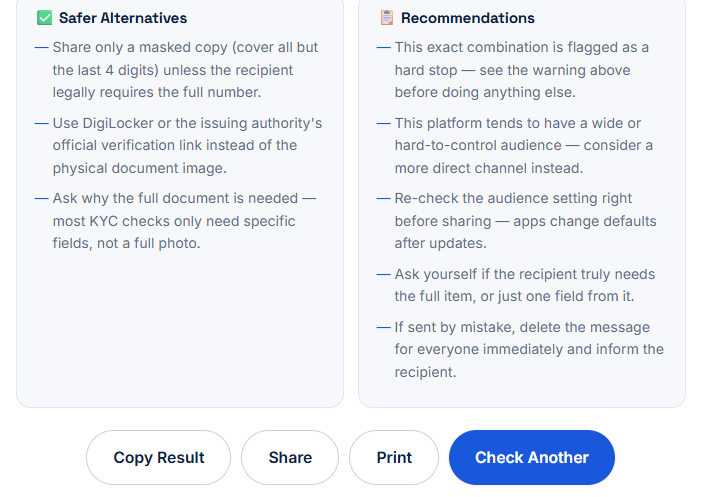
Recommendations and Safer Alternatives
Digital Safety Checker homepage where users can start checking privacy risks before sharing personal information online.
One of the most valuable features of Digital Safety Checker is its personalized recommendations. Instead of simply displaying a risk score, the tool provides practical suggestions that can help reduce unnecessary privacy exposure.
Depending on your answers, the recommendations may include masking sensitive information, using password-protected files, verifying the recipient's identity, sharing through official platforms, limiting file access, or avoiding public links. These suggestions are based on widely accepted privacy best practices and are intended to help you make smarter online decisions.
In many situations, simple changes can significantly improve your privacy. Cropping an image, removing metadata, hiding QR codes, blurring identification numbers, or sharing a temporary download link instead of a permanent public URL are all effective ways to reduce unnecessary exposure.
If the tool identifies a higher level of risk, take a few moments to review the recommendations before continuing. A small adjustment today can help protect your personal information from future misuse.
Best Practices Before Sharing Personal Information Online
Share only the information that is absolutely necessary.
Verify the identity of every recipient before sending sensitive documents.
Use official websites and trusted communication platforms whenever possible.
Blur or mask personal information that is not required.
Avoid posting identity documents publicly on social media.
Review screenshots carefully before sharing them.
Use secure passwords and two-factor authentication for cloud storage accounts.
Delete shared files when they are no longer required.
Keep software and mobile applications updated.
Think carefully before clicking the Send button.
Common Mistakes People Make
Many privacy incidents occur because people unintentionally reveal more information than they intended. Common mistakes include sharing complete identity documents when only one section is required, posting travel tickets that contain booking references, uploading resumes with personal contact details to public platforms, sending screenshots without checking hidden information, or sharing cloud links that remain publicly accessible.
Being aware of these common situations makes it much easier to protect your digital identity. A quick review before sharing can often prevent unnecessary privacy risks and help keep your personal information under your control.
Final Thoughts
Digital Safety Checker is designed to help you make better privacy decisions before sharing information online. By answering a few simple questions, you gain valuable insight into potential risks and receive practical recommendations that encourage safer online behavior. Whether you're sharing documents for work, education, banking, travel, or personal communication, taking a few extra seconds to evaluate the situation can make a meaningful difference.
Online privacy is not about avoiding technology—it's about using technology responsibly. Make it a habit to check before you share, protect your personal information, and encourage friends and family to do the same. Small privacy-conscious decisions today can help prevent larger problems in the future.
Frequently Asked Questions
How long does the safety check take?
The Digital Safety Checker completes the assessment in just a few seconds. Simply answer the four questions about what you are sharing, where you are sharing it, who can access it, and why you are sharing it. Once you've finished, your Digital Safety Score and personalized recommendations appear instantly—no waiting or registration required.
Can I check multiple documents?
Yes. You can use the Digital Safety Checker as many times as you like. If you're planning to share several documents or different types of personal information, it's recommended to evaluate each one separately so you receive the most accurate privacy guidance for every situation.
Do I need to create an account?
No. The tool is completely free to use and does not require registration, login, or account creation. You can access the Digital Safety Checker directly from your browser and start evaluating your sharing decisions immediately.
Will my information be uploaded or stored?
No. Your privacy is our priority. The Digital Safety Checker performs all calculations directly within your browser. Your answers, documents, or personal information are not uploaded, stored, or shared with our servers, allowing you to use the tool with confidence.
What should I do if I receive a High Risk score?
A High Risk score means you should review your sharing decision carefully before continuing. Consider masking sensitive information, verifying the recipient's identity, using an official platform, or choosing a more secure method of sharing. Follow the recommendations provided by the tool to reduce unnecessary privacy risks whenever possible.
Can I use the Digital Safety Checker on my phone?
Yes. The tool is fully responsive and works on smartphones, tablets, laptops, and desktop computers. As long as you have a modern web browser and an internet connection, you can quickly evaluate privacy risks from virtually any device.